Hello everyone, hope you are fine. Today’s post is actually by special request. I used to have a widget on this site that displayed my Twitter feed in a sidebar. Now I barely use the artist I used to be known as Twitteri want to change it to a mastodons widgets. So I posted to Mastodon asking people how to embed feeds into it WordPress and it seems like many other people also have this request. A quick look to your right will show that I managed to solve this problem and it wasn’t actually difficult, but people have asked if I could share my solution. So that’s what I’m going to do today. Read on if you too want to embed your Mastodon activities into your WordPress site.
Now I have to say up front that I really can’t take any credit for this. All the work is done through a great plugin I found called Include Mastodon Feed by Wolfgang.lolit’s in the plugin store and it’s free. Just look for it. What this plugin does is allow you to use shortcodes to embed your feed, but it requires a bit of setup. So let’s talk about the process.
You need your Mastodon account ID number which you can get via the API. Log in to your Mastodon instance and then use the following URL structure to get the data in JSON.
Obviously that’s my account so change the bits after q= to your username and instance. As you can see, I’m using Mastodon.social so I don’t know how easily this would work for a self-hosted instance. I made sure I was logged in at Mastodon.social and just entered that URL. This is what was returned…
As you can see from the image above, the account ID number is listed at the top of your results. Take note of this, it is very important. Next we will use it to create a shortcode embed.
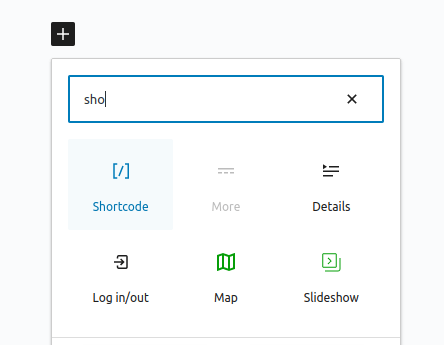
Go wherever you want the Mastodon feed to appear, be it a new page, post, or in my case a sidebar and add a shortcode block or widget by selecting it as below.

All we need to do now is create a shortcode and test it. The format should be like this:
[include-mastodon-feed instance="YOUR-INSTANCE" account="YOUR-ACCOUNT-ID"]In my case, this is what I use…
[include-mastodon-feed instance="mastodon.social" account="553058" limit="5"]I made some mistakes and needed some adjustments to get it to work. For Instance variables don’t add “ or something like that at the beginning. I did that at first and it didn’t work. Once again because I am the main one Mastodon.social I don’t know how easily this would work with other people’s, like self-hosted examples.
The only other problem I had after getting this code working was how many posts were pulled by default. A list of 20 posts appeared at the bottom of my page, so a little research into the FAQ and good plugin documentation showed that I could add limit=”5″ to reduce it to 5 posts. Of course you can set this to your liking and also check out many other options to customize the results. Quick recap of the steps involved:
- Install Include Mastodon Feed plugins
- Get your ID number with a JSON query URL
- Add a shortcode block
- Write your short code using the ID number and whatever options you want
Hey presto, there it is, my activity feed is embedded all thanks to the great work of the plugin author Wolfgang.lol. I hope this helps some of you organize it too. If you use this plugin, please consider donating something to the author to show your support, as I would like to do.
That’s it for this requested post. I’m sure I’ll be back in the future with other things. If you use this plugin and found this guide useful, or maybe found something I missed, let me know in the comments.
See you,
And
Digital Agency
we specialize in maximizing your online visibility and driving measurable results through strategic SEO solutions. We’re here to help businesses like yours rank higher, attract quality traffic, and achieve long-term growth in the ever-evolving digital landscape.